Description
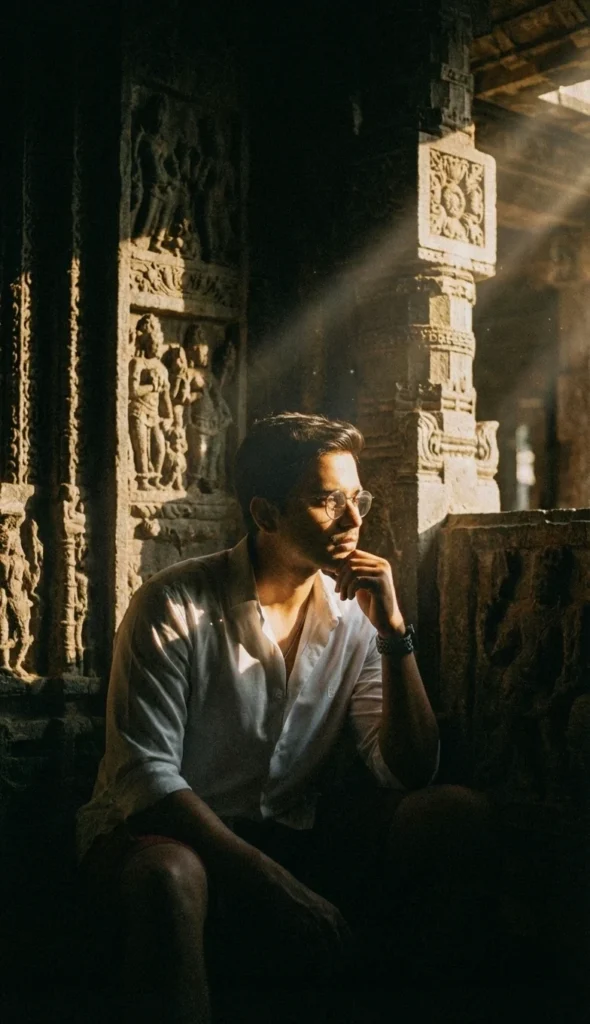
This cinematic temple portrait shows a man seated in deep shadow inside an ancient stone temple. He rests his chin thoughtfully on his hand. His pose and expression create a calm, contemplative mood. Sharp shafts of golden sunlight pierce the darkness. They illuminate his face and parts of his body. The beams also reveal rich stone textures on the surrounding pillars and carvings.
High-contrast chiaroscuro lighting creates strong highlights and deep shadows. This adds emotional weight and mystery to the scene. A 35mm film look introduces subtle grain and vintage character. The grainy texture makes the image feel timeless and tactile.
The visual style feels cinematic, moody, and deeply narrative. This image works well for blog headers about reflection, philosophy, or inner growth. It also suits book covers and album art exploring spiritual or historical themes. In addition, it is ideal for posters, editorial layouts, or AI art portfolios that require a dramatic, story-rich portrait set in an ancient environment.
PROMPT (Cinematic temple portrait):
Generate a cinematic, high-definition photograph of a man seated in deep shadow inside an ancient stone temple. He should be resting his chin thoughtfully on his hand, embodying a contemplative mood. Dramatic, sharp shafts of golden sunlight pierce through the darkness, illuminating his face and highlighting the intricate textures of the ancient stone pillars and detailed bas-relief carvings in the background. Use high-contrast, chiaroscuro lighting to create a heavy, atmospheric effect. The image should have the look and feel of being shot on a 35mm lens with a grainy film aesthetic, producing a moody and evocative scene.
How to Use This Prompt:
- Upload Your Reference Image:
Upload the photo of the person. This prompt maintains 100% face and hairstyle accuracy. - Copy & Paste the Prompt:
After uploading your image, paste the full prompt text into the same prompt box in your AI image generator (Gemini).