Description
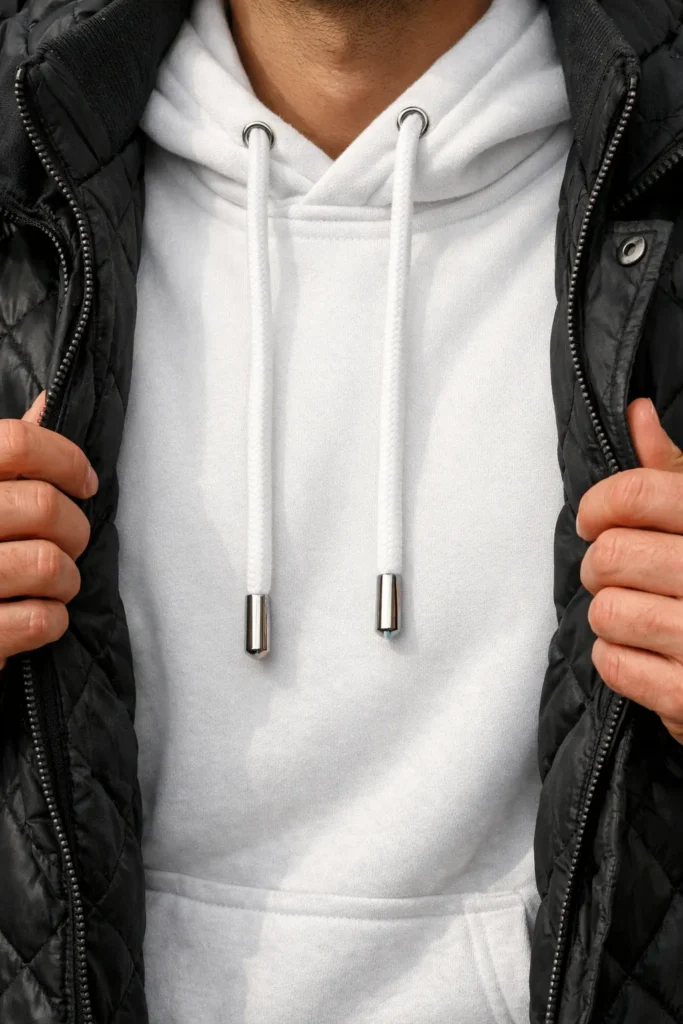
This hoodie texture close up puts all the attention on fabric, detail, and finish. The image shows a white hoodie layered neatly beneath a black quilted jacket, with hands holding the jacket open to reveal the hoodie clearly. The metallic-tipped drawstrings fall naturally, adding a subtle yet eye-catching highlight at the center of the frame. This setup feels casual but intentional, like a quick reveal of a favorite everyday outfit.
The visual style is clean, modern product photography with a strong focus on texture. You can almost feel the smooth knit of the hoodie and the structured quilted pattern of the jacket. The metallic tips on the drawstrings catch light softly, showing their shine without looking harsh or overprocessed. Stitching, seams, and fabric edges all appear crisp, which helps communicate quality and craftsmanship.
Lighting is natural and soft, coming from one main direction to create gentle shadows and dimension. This kind of light keeps whites true and blacks rich while still revealing the surface details of both fabrics. It avoids harsh reflections on the metal tips, instead giving them a controlled glimmer that feels realistic and tactile.
This image is ideal for fashion e-commerce listings, product pages, and lookbooks where buyers want to see material quality up close. It also works well for social media campaigns focusing on detail shots, style breakdowns, or “outfit essentials” posts. Photographers and AI artists can use it as a reference for apparel close-ups, natural-light textile photography, and composition that highlights small but impactful design elements like drawstring aglets.
PROMPT (Hoodie texture close up):
Generate a close-up image focused on a white hoodie featuring metallic-tipped drawstrings, layered beneath a black quilted jacket. The jacket should be held open by hands to clearly reveal the hoodie underneath. Emphasize texture details, such as the shine on the metallic tips and the quilted pattern of the jacket, capturing a realistic and tactile appearance with natural lighting. aspect ratio 4:5.
How to Use This Prompt:
- Open the image tool in ChatGPT: In the ChatGPT interface, make sure you’re on a model that supports image generation (for most users this is labeled something like “Create image” or available under a Tools menu).
- Select the option to create a new image so you get a text box specifically for an image prompt.
- Copy & Paste the Prompt: Paste the full prompt text into the prompt box and click on submit.