Description
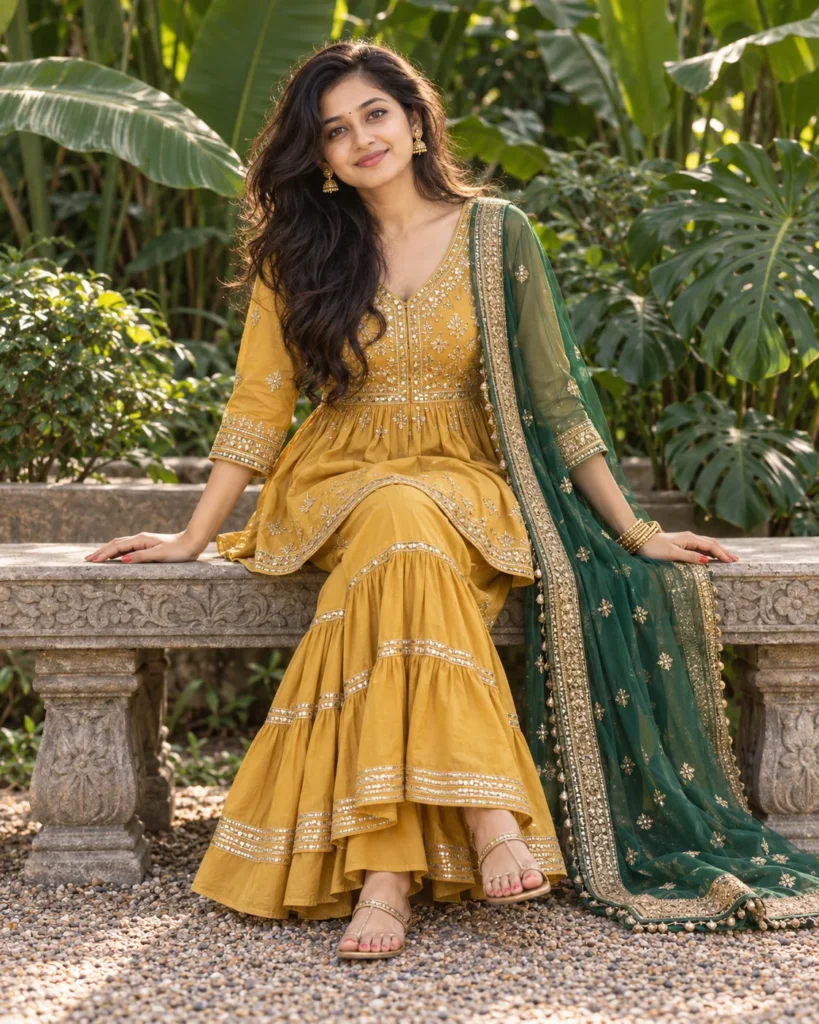
This sharara suit portrait prompt creates a luminous festive look that highlights your natural elegance. The setup preserves your genuine facial structure, hairstyle, and body shape while seating you naturally in a lush garden setting. Because the prompt specifies relaxed posture and a warm smile, the final image feels spontaneous rather than artificial. You receive a high-end fashion portrait that looks worthy of a luxury designer lookbook.
Soft overcast daylight spreads evenly across your skin to eliminate harsh shadows and flatter your features. A subtle top highlight catches the glossy Chanderi silk fabric to give your outfit realistic texture and depth. The telephoto framing gently blurs the tropical garden leaves so your face and jewelry remain in sharp focus. Deep emerald green foliage and grey stone balance the warm mustard gold for a rich, vibrant color palette.
You can easily tweak a few words in the editorial prompt to match your personal style:
- Outfit and palette: Change ‘mustard-gold Chanderi silk’ and ’emerald-green organza’ to ‘ruby red velvet’ and ‘dusty rose tissue’ for a winter evening look.
- Setting and scenery: Swap ‘tropical banana leaves’ and ‘carved stone garden bench‘ for ‘antique wooden swing’ on an open marble veranda.
- Framing and angle: Replace ‘eye-level full-body shot’ with ‘close-up portrait’ to focus tightly on your earrings, neckline embroidery, and makeup.
Choose a clear front-facing portrait from your phone gallery where your face is well lit by natural daylight. Skip photos with dark sunglasses, intense beauty filters, or distracting shadows so the AI maps your features cleanly. Copy the prompt below, add your favorite reference shot, and create your custom designer portrait in seconds.
Copy This Sharara Suit Portrait Prompt
A professional e-commerce catalog shoot with an editorial feel, featuring the woman from the uploaded reference photo seated full-body outdoors on a low carved stone garden bench. Preserve her exact face, hairstyle, and body proportions, with her face clearly visible and detailed. She sits upright near the edge of the bench with her ankles crossed gracefully in front of her, both hands resting lightly on the stone bench surface beside her hips with natural fingers, tilting her head slightly and smiling warmly at the camera. She wears a festive mustard-gold Chanderi silk short peplum kurta featuring antique gold gota-patti embroidery on the yoke and cuffs, paired with wide-flared tiered sharara trousers and a sheer emerald-green organza dupatta with gold zari borders pinned neatly to her right shoulder. Antique gold temple-style stud earrings, stacked gold bangles on her left wrist, coral nail polish, and gold-strapped flat sandals. Background: broad tropical banana leaves, split-leaf monsteras, and dense dark green foliage framing the carved stone bench, with a fine gravel path beneath her feet. Eye-level full-body shot, medium telephoto lens, f/4, face and embroidered outfit in sharp focus, smooth background bokeh. Soft overcast natural daylight with a warm directional highlight catching the silk sheen from above, smooth shadow transitions, moderate contrast. Vibrant, rich color grade in a palette of mustard gold, emerald green, antique bronze, grey stone, and deep foliage green. Realistic skin texture, clean digital capture, photorealistic. Natural hands, correct anatomy, no text or logos, no distorted features. Aspect ratio 4:5.
How to Use This Prompt:
- Upload Your Reference Image: First, upload the photo of the person. By doing so, you allow this prompt to strongly preserve the facial structure, proportions, and hairstyle from your reference image.
- Copy & Paste the Prompt: Once you have attached the image, paste the full prompt text into the ChatGPT message box. Then, hit enter to generate your scene.