Description
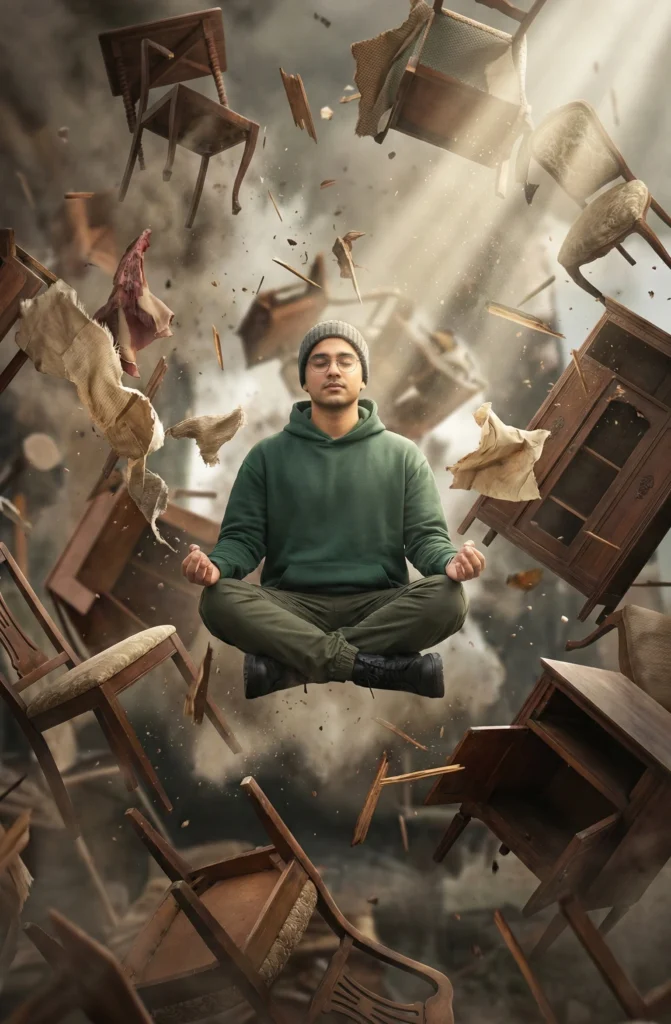
This surreal levitation portrait places the subject in the calm center of pure chaos. The surreal levitation portrait style makes the person appear weightless and completely untouched while the world breaks apart around the person. Antique furniture, splinters, and torn fabric explode outward in every direction, yet the person stays seated in a meditative pose. Dust swirls gently through the air, catching the light and adding depth to the scene. The visual contrast between stillness and motion feels dramatic and very cinematic.
A strong shaft of light cuts through the darkness and lands directly on person’s face. It creates a natural spotlight that shapes the person features and guides the viewer’s eye. The 50mm lens look and f/2 depth of field keep the person sharp while the chaos around person falls into a soft blur. This combination gives the image a physics‑simulation feel, like a film frame frozen at the perfect moment. The black or darkened surroundings make every fragment, shadow, and highlight stand out clearly.
You can use this image as a powerful hero visual for mindset, resilience, or “calm in chaos” themes. It works well for blog headers and thumbnails about focus, meditation, or emotional overload. It also fits album covers, posters, and key art for concept films, games, or music projects that explore contrast between inner peace and outer disorder.
The final image feels like a single, impossible moment captured by a camera. Calm held steady inside complete chaos.
PROMPT (Surreal levitation portrait):
A surreal levitation shot of the subject, uploaded face as reference, mediating in the center of a chaotic explosion of antique furniture, splinters and fabric frozen in mid-air, the subject remains untouched and serene, dust swirling, dramatic shaft of light hitting the face, 50mm lens f/2, high shutter speed look, physics simulation rendering.
How to Use This Prompt:
- Upload Your Reference Image: Upload the photo of the person. This prompt is designed to strongly preserve facial structure, proportions, and hairstyle from the reference image.
- Copy & Paste the Prompt: After uploading your image, paste the full prompt text into the same prompt box in your AI image generator (Gemini).