Description
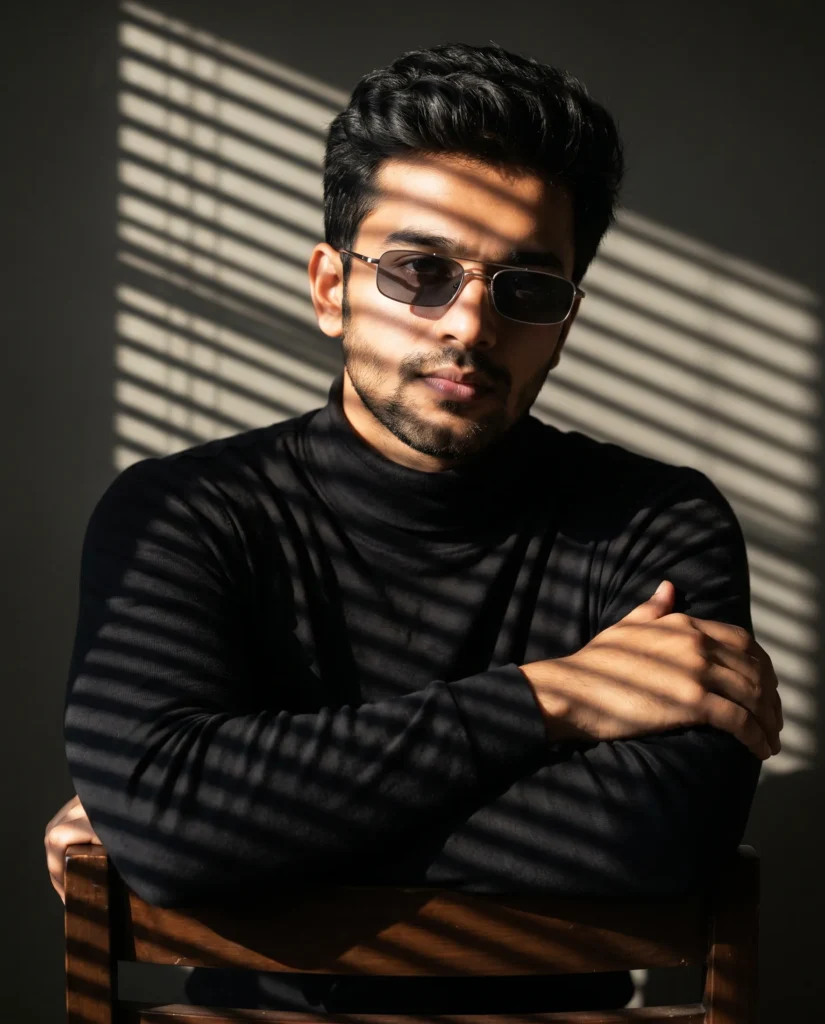
This cinematic mens fashion portrait prompt captures a man seated on a wooden chair with his arms crossed over the backrest, featuring dramatic lighting through venetian blinds. His posture feels relaxed yet controlled, while the fitted black turtleneck and sleek silver rectangular sunglasses add a sharp, modern edge. The overall styling suggests quiet power and refined confidence.
The visual style is ultra-detailed and highly realistic. Specifically, every facial feature stays true to the original reference, ranging from bone structure to hairstyle texture and length. Furthermore, clean lines, rich blacks, and subtle skin tones work together to create a polished luxury editorial look. Ultimately, the minimalist dark background keeps all attention focused on the subject and the graphic light patterns.
Lighting is the star of this image. Strong directional light passes through venetian blinds, carving bold horizontal stripes of light and shadow across his face, clothing, and the wall behind him. This creates a powerful geometric rhythm that feels both cinematic and dramatic. The 85mm lens, sharp focus, and shallow depth of field isolate the subject and softly blur the background.
You can use this image as a hero visual for luxury fashion or eyewear campaigns that want a moody, sophisticated feel. It also works well for film posters, thriller or noir-inspired key art, and streaming thumbnails that need strong atmosphere in a single frame. Finally, it is ideal for creative portfolios, personal branding, and social media content where you want to communicate authority, focus, and high-end taste through lighting and pose. Short, clear details make this visual easy to repurpose for web, print, or editorial layouts while keeping a strong, memorable impact.
Gemini Prompt: Cinematic Mens Fashion Portrait
Generate an ultra-detailed cinematic portrait of a man sitting on a wooden chair with his arms crossed over the chair backrest and his head slightly tilted. Use the attached reference photo for facial identity and preserve exact proportions, maintaining the same hairstyle texture and length and exact facial proportions.
He wears a fitted black turtleneck and sleek thin silver rectangular metal frame sunglasses with dark grey lenses.
Strong directional light enters through venetian blinds, casting dramatic horizontal shadow lines across his face, body, and the background wall behind him. The striped light and shadow pattern falls precisely across his facial features and clothing, creating a bold geometric contrast. The composition is clean and minimalist with a dark neutral background and strong geometric light patterns dominating the frame. His expression is confident yet calm, adding quiet authority to the scene. The overall mood is moody, sophisticated, and cinematic with a luxury editorial atmosphere and dramatic light and shadow play throughout. Shot on an 85mm lens, sharp focus, shallow depth of field, ultra-detailed, high resolution, aspect ratio 4:5.
5 Sunglass Prompt Modifiers
1. Thin Metal Rectangle Frames
sleek thin silver rectangular metal frame sunglasses with dark grey lensesClean, minimal, luxury editorial feel
2. Classic Black Wayfarer
bold matte black wayfarer sunglasses with dark lensesStrong and confident, high contrast against the turtleneck
3. Round Thin Gold Frames
delicate thin gold round frame sunglasses with deep smoke-tinted lensesSophisticated and artistic, adds intellectual edge
4. Thick Black Square Frames
oversized thick matte black square frame sunglasses with dark lensesBold statement, strong editorial presence
5. Rimless Rectangle
minimalist rimless rectangular sunglasses with barely visible thin silver bridge and dark lensesUltra minimal, lets the face and shadows dominate
How to Use This Prompt:
- Upload Your Reference Image: First, upload the photo of the person. By doing so, you allow this prompt to strongly preserve the facial structure, proportions, and hairstyle from your reference image.
- Copy & Paste the Prompt: Once you have attached the image, paste the full prompt text into the Gemini message box. Then, hit enter to generate your scene.