Description
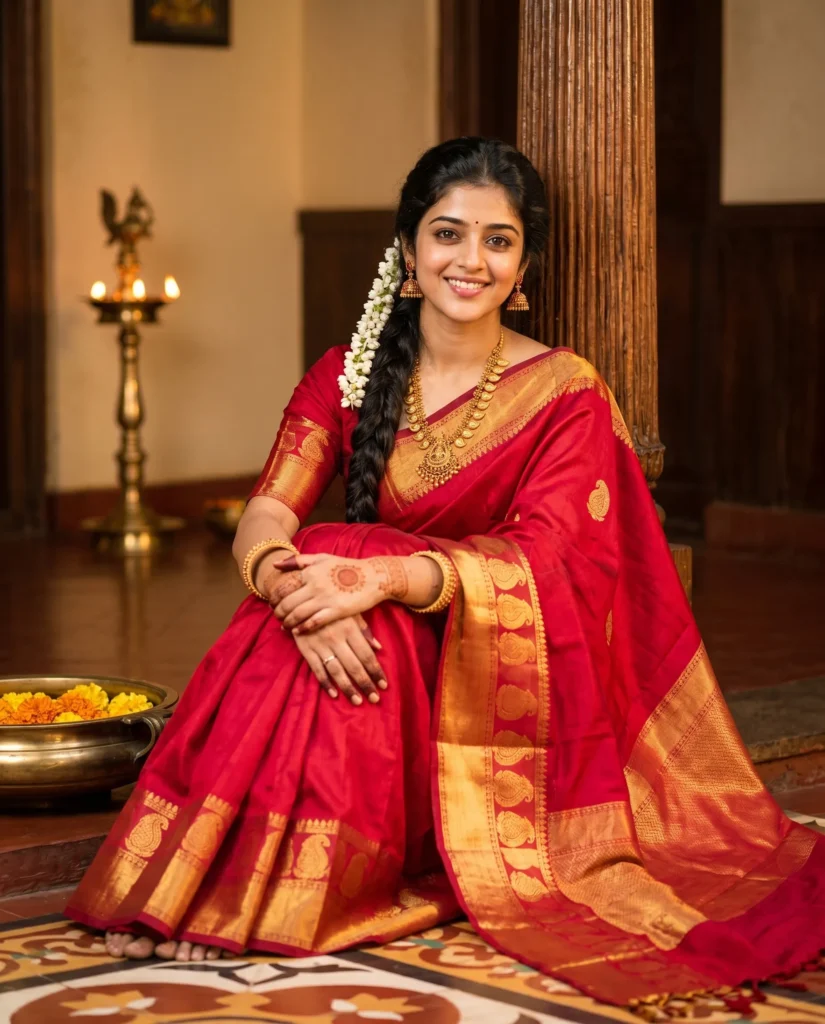
This red saree prompt creates a stunning full-length portrait brimming with cultural warmth and rich details. Specifically, the scene captures a graceful woman seated elegantly on polished Athangudi tiles. At the same time, she leans against a beautifully textured teakwood pillar inside a cozy traditional home.
The visual style focuses on ultra-realistic photography and deep cultural authenticity. To achieve this, the subject wears a vibrant crimson Kanjeevaram silk saree. In particular, a thick golden zari border and classic mango motifs stand out beautifully against the fabric. Furthermore, she wears carefully selected antique gold jewelry, which includes a stunning mango mala necklace and intricate Kemp stone jhumka earrings. Fresh white jasmine flowers adorn her traditional long braid. Soft natural makeup completes her highly elegant look.
Warm cinematic lighting truly transforms this peaceful scene. As a result, gentle highlights and soft natural shadows flow evenly through the room. Ultimately, this precise lighting accentuates the authentic skin texture and the heavy silk fabric. Meanwhile, a glowing brass Vilakku lamp adds moody depth to the background, complemented by a brass Urli bowl with floating marigolds sitting peacefully nearby.
You can use this generated image for three highly specific purposes. It works perfectly for traditional fashion brand campaigns. Brands can easily showcase elegant silk collections during the busy festive season. Additionally, you can use it to elevate lifestyle blogs or targeted social media content. It also pairs beautifully with detailed articles about Tamil heritage aesthetics, classic bridal styling, or cultural jewelry guides. Equally important, it serves as a striking addition to any professional AI art portfolio. It proves your advanced control over complex texture rendering, character consistency, and atmospheric lighting.
This prompt consistently delivers effortless elegance and cinematic warmth. You gain a visually rich reference image that perfectly preserves facial identity.
Gemini Prompt: Traditional Indian Red Saree Portrait
Generate a full-length realistic portrait of the woman from the uploaded photo. Use the uploaded photo for facial identity and preserve her exact facial structure, proportions, skin tone, and recognizable features.
She is seated gracefully on a polished Athangudi tiled floor in a cozy traditional home, leaning against a textured teakwood pillar. Both knees are drawn slightly upward and positioned together. Both hands rest elegantly on her knees. She looks directly at the camera with a soft, thoughtful expression. She wears a traditional vibrant crimson red Kanjeevaram silk saree featuring a thick, intricate golden zari border with traditional mango motifs, paired with a matching red silk blouse with subtle gold embroidery on the sleeves. Her long, voluminous wavy black hair is styled in a traditional braid adorned with fresh white jasmine flowers (gajra) cascading over her shoulder. She is adorned with traditional jewelry, including an antique gold mango mala necklace, Kemp stone jhumka earrings, and ornate gold kangan bangles.
Her makeup is soft and natural with winged eyeliner, a small black bindi, and a traditional maruthani (henna) design on her hands.
The room has a warm heritage aesthetic with a brass Urli bowl filled with water and floating marigolds, rich textures, and subtle traditional wooden décor. A decorative brass Vilakku lamp glows softly in the background, adding depth to the scene without distracting from the subject.
Warm cinematic lighting streams through the room, creating gentle highlights and natural shadows. Ultra-realistic photography, authentic skin texture, shallow depth of field, 85mm lens, professional portrait composition, high detail. Aspect ratio 4:5.
How to Use This Prompt:
- Upload Your Reference Image: First, upload the photo of the person. By doing so, you allow this prompt to strongly preserve the facial structure, proportions, and hairstyle from your reference image.
- Copy & Paste the Prompt: Once you have attached the image, paste the full prompt text into the Gemini message box. Then, hit enter to generate your scene.