Description
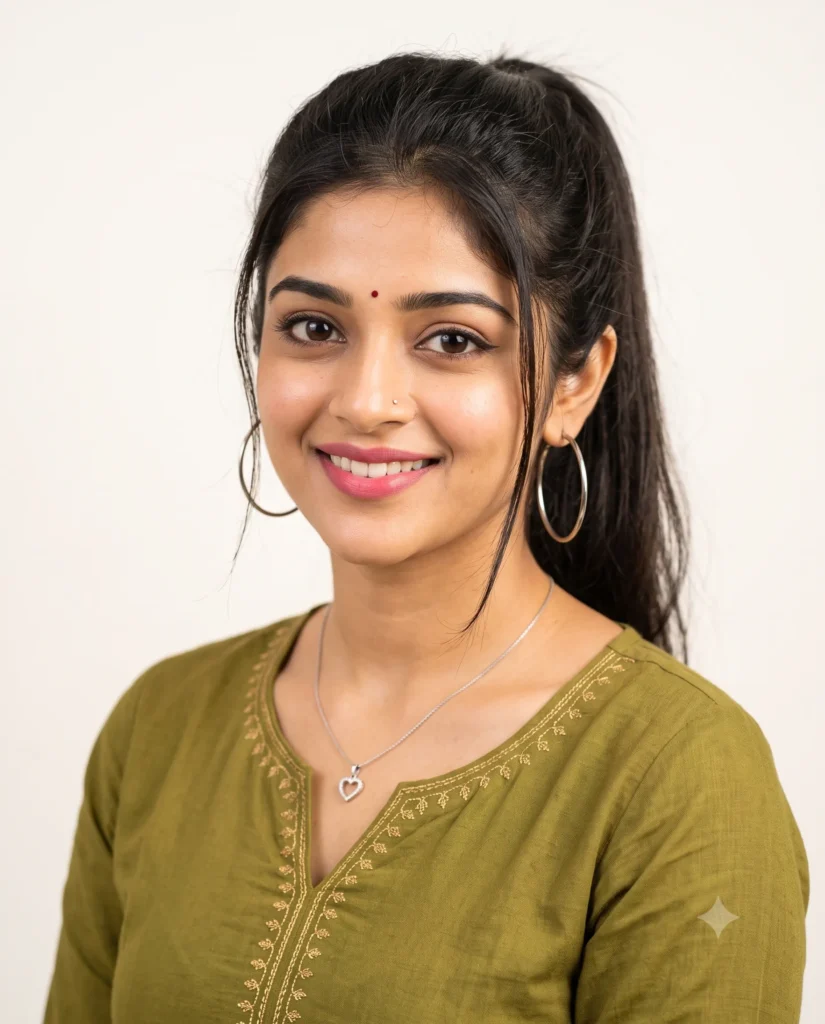
You can create a beautiful and realistic image instantly with this woman photo prompt. It generates a warm portrait of a young South Asian woman smiling directly at the camera. She wears a traditional olive green kurti with elegant gold embroidery. The details are incredibly sharp and true to life.
The lighting in this scene is soft and even. It creates a gentle glow on her skin and highlights her cheekbones beautifully. The background is a simple off-white color. This clean backdrop brings all the attention right to her face and her delicate silver jewelry.
- Professional LinkedIn profile picture reference
- Social media avatar for Instagram
- Character reference for a story or design project
This warm and inviting style works perfectly for personal and professional profiles. Copy the text below and try it with your own reference photo to see the magic.
Gemini Prompt: South Asian Woman Photo
A medium close-up studio portrait of a beautiful young South Asian woman smiling warmly directly at the camera. Use the attached reference photo for facial identity and preserve facial structure and proportions. She has a flawless, exceptionally clear, and radiant complexion with a natural, healthy skin-glow and soft dewy highlights on her cheekbones. She has dark hair tied up in a high ponytail with a few loose strands framing her face. She is wearing a traditional olive green kurti with subtle, elegant gold embroidery around the V-neckline. Her makeup includes clean winged eyeliner, soft pink lipstick, a small nose pin, and a small round red bindi on her forehead. She is accessorized with large silver hoop earrings and a delicate silver chain necklace featuring a heart shaped pendant. The background is a solid, minimalist neutral off-white. Soft, even, diffused indoor lighting, photorealistic, sharp focus, High resolution. Aspect ratio 4:5.
How to Use This Prompt:
- Upload Your Reference Image: First, upload the photo of the person. By doing so, you allow this prompt to strongly preserve the facial structure, proportions, and hairstyle from your reference image.
- Copy & Paste the Prompt: Once you have attached the image, paste the full prompt text into the Gemini message box. Then, hit enter to generate your scene.


![AI-generated image: Cinematic Tokyo JR Station Prompt [Exact Lighting & Lens Settings]](https://art8ai.com/wp-content/uploads/2025/11/Cinematic-8K-Portrait-Woman-at-Quiet-Tokyo-JR-Station-400x440.webp)