
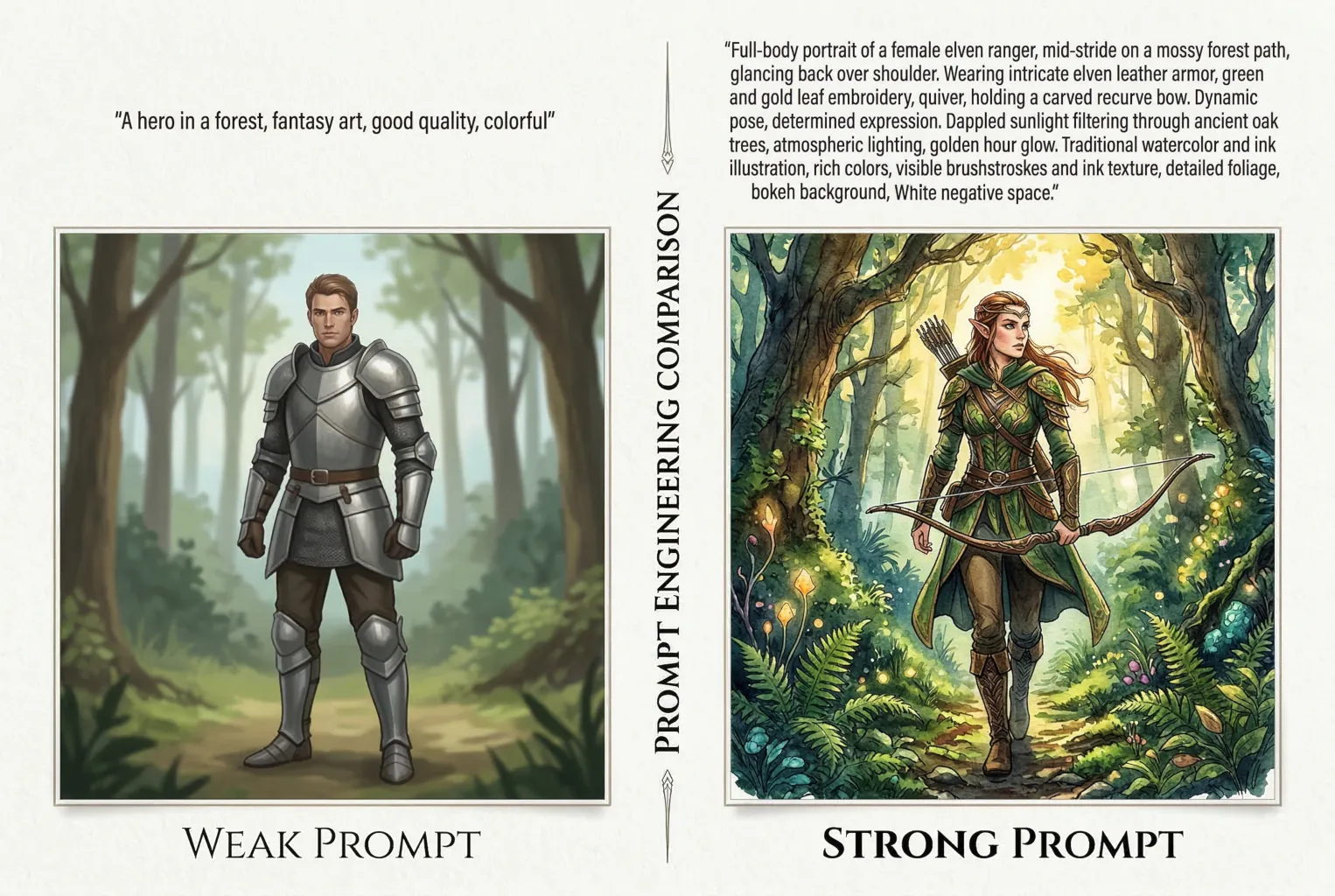
Most people think AI image generators are unpredictable.
They type a prompt, generate an image, and hope for the best.
But AI art does not work on luck. It works on structure.
The difference between random results and stunning images usually comes down to one thing: the prompt.
Well-written AI art prompts guide the model’s decisions about subject, lighting, composition, and style. Poor prompts leave those choices up to the AI.
In this guide, you’ll learn a simple framework used by experienced creators to write clear, structured prompts that consistently produce better images in Midjourney, Stable Diffusion, and DALL·E.
What a Good AI Art Prompt Actually Looks Like
Here’s something that surprises most people: a longer prompt isn’t necessarily a better prompt.
AI image models have token limits, and a sprawling paragraph of adjectives can actually cause the model to “forget” details mentioned at the end.
What works is a structured, keyword-dense prompt that reads more like a film director’s shot list than a short story.
The exception is DALL-E 3, which was built to handle conversational language. But we’ll get to platform differences shortly.
A strong prompt tells the model seven things, in roughly this order:
- Subject — who or what is in the image
- Pose or action — what they’re doing
- Clothing — if there’s a human character, what they’re wearing
- Environment — where it’s happening
- Lighting and atmosphere — the mood
- Art style and medium — how it’s rendered
- Perspective & Finish — how the viewer sees it and what the surface looks like
That’s it. That’s the skeleton of almost every professional prompt.
A jewelry brand using Midjourney to replace expensive photoshoots, for example, might write: macro photography of a gold ring, resting on dark velvet, soft volumetric lighting, 85mm lens, f/1.8, studio product shot.
That prompt is 20 words and it’ll consistently outperform a 200-word description that wanders around the concept.
The Core AI Art Prompt Framework, Broken Down
Subject and Pose: Be Specific, Not Descriptive
The subject is where most people spend too many words and too little precision.
“A beautiful woman standing in a forest” gives the AI enormous latitude — and AI loves to fill latitude with mediocrity.
“A woman in her 30s, mid-stride, glancing back over her shoulder” gives it something to work with.
Pose matters more than most people realize. The model can’t read “dynamic” — but it can read “crouching, arms extended forward, weight on left foot.”
Think of how a casting director would describe a moment, not how a poet would.
Clothing in AI Art Prompts
If your subject is a human character, clothing deserves its own dedicated slot in the prompt — not an afterthought tacked onto the subject description. The model makes a lot of assumptions about clothing based on era, setting, and style; if you don’t specify, it’ll fill the gap with something plausible but probably not what you intended.
Be as precise as a costume designer would be.
“Wearing clothes” is useless.
“A worn brown leather jacket over a white linen shirt, collar open, sleeves pushed to the elbow” gives the model something it can actually render.
Details like fabric, fit, condition (worn, tailored, oversized), and specific garment names — trench coat, hanbok, boiler suit — all produce more consistent, intentional results than vague descriptors like “casual” or “stylish.”
Environment and Lighting in AI Art Prompts
Lighting is the fastest way to transform a flat image into something cinematic.
And it’s one of the most underused elements in beginner prompts.
A few terms worth knowing:
- golden hour
- overcast diffused light
- rim lighting
- chiaroscuro
- practical lighting from a neon sign.
Each of these triggers a completely different visual register.
The environment benefits from the same specificity. “An urban environment at night” is forgettable. “A rain-slicked street in Tokyo, 2am, convenience store glow reflecting in puddles” — that’s a scene.
Perspective & Finish: The Step That Changes Everything
This is the most misunderstood step in the framework — because it’s not just about cameras.
It’s about answering two questions: how is the viewer looking at this, and what does the final surface feel like?
The answer changes completely depending on whether you’re prompting for a photograph, a painting, or a digital illustration.
- For photorealism, camera and film details do the heavy lifting. Think about focal length, camera body, and film stock:
shot on a Hasselblad medium format, 80mm lens, Kodak Portra 400, slight grain, shallow depth of field. These terms tell the model to render light, texture, and color the way a physical camera would capture them.Anamorphic lens flareormacro with f/2.8each produce a completely different spatial feeling. - For traditional fine art, swap camera specs for material and technique. The “finish” here is the physical surface:
thick impasto brushstrokes, oil on linen,wet-on-wet watercolor, blooms visible,charcoal sketch on textured cold press paper, smudged midtones,palette knife texture, rough edges. These are the terms a painter would use to describe how a work was made — and the model responds to them accordingly. - For digital art and illustration, the lens is replaced by rendering style and viewing angle:
cel-shaded with visible line art,isometric perspective,flat vector, no gradients,low poly with hard edges,Unreal Engine 5 cinematic render,thick black outlines, limited color palette. The “finish” here is less about surface texture and more about how the image was built — which in digital art is just as meaningful.
You don’t need to be an art historian to use this well. But building a vocabulary across these three modes — photography, fine art, digital — is genuinely the fastest way to level up your prompts. It’s a skill, not a trick.
Advanced Techniques: Going Beyond Basic Prompting
Negative Prompts in AI Art
Think of a negative prompt as a veto list.
You’re telling the model what to leave out — and this is often more powerful than adding more to the positive prompt.
Common negative prompt additions:
blurrylow qualityextra limbsdeformed handswatermarkoversaturatedplastic skinoverexposed
In Stable Diffusion especially, a well-crafted negative prompt can fix recurring artifacts that no amount of positive prompting will solve.
Midjourney handles this differently — it uses a --no parameter rather than a separate negative field. So --no text, logos, watermark strips out things the model might add by default.
Technical Parameters: The Dials Most People Ignore
If you’re using Midjourney and you haven’t touched the parameters yet, you’re leaving a lot of control on the table.
--arsets the aspect ratio.--ar 16:9for widescreen,--ar 2:3for portrait. This alone will change your composition dramatically.--s(stylize) controls how strongly the model applies its artistic interpretation. Lower values stay closer to your prompt; higher values get more creative. The default is 100; try--s 250when you want something painterly, or--s 50when you need literal accuracy.--c(chaos) introduces variation. At--c 0you get four very similar outputs. At--c 80you get four very different ones. Useful for exploration; less useful when you need consistency.--seedis your best friend for character consistency. Lock in a seed number from a result you like, and future prompts using the same seed will maintain structural similarity. It’s not perfect, but it’s the closest thing to “keep this character” that Midjourney offers natively.
Image-to-Image: When Text Isn’t Enough
Professional workflows rarely use text alone — and that’s worth saying plainly. Real production pipelines use reference images, character seeds, sketch uploads, and regional inpainting to get to a final asset.
Image-to-image generation lets you upload a photo, sketch, or existing image as a structural starting point. The model then generates something influenced by both your text prompt and the visual reference. This is how indie game studios generate dozens of consistent character concepts — they establish one reference, then iterate with text on top of it.
Midjourney’s --sref (style reference) and --cref (character reference) parameters have made this much more accessible. Upload a reference, set a weight, and the model will try to maintain visual consistency across generations.
Platform Dialects: Not All AI Tools Speak the Same Language
This is an AI art prompt guide, not a Midjourney guide — so let’s be clear that the platform you’re using changes how you should write your prompts.
Midjourney
Midjourney is built for cinematic and artistic output. It responds well to art-direction language, specific visual references, and parameter tuning. It tends to be opinionated — which means it’ll make beautiful images, but sometimes not your beautiful image. Use weights and parameters to rein it in. Over 21 million users are on its platform, which tells you something about its creative ceiling.
DALL-E 3
This is the conversational one. DALL-E 3 is powered by GPT-4, which means it understands natural language instructions very well — including corrections and revisions. “Keep everything the same but change the car to red and make the lighting more dramatic” is a valid DALL-E 3 prompt. It’s also the most literal of the three major platforms, which makes it great for storyboarding and client-facing iteration.
Stable Diffusion
The open-source option, and by far the most granular. Stable Diffusion requires more technical input, but rewards that effort with pixel-level control — especially when combined with tools like ControlNet, which lets you constrain exactly where elements appear in the frame. If you want to train a custom model on your brand’s visual style, or generate images locally without a subscription, this is your tool. The learning curve is steeper, but the ceiling is higher.
Adobe Firefly
The commercially safe choice. Firefly is trained exclusively on licensed content, which means every image it produces is cleared for commercial use without IP risk. For enterprise teams, marketing departments, and architectural firms inserting figures into CAD renders for public materials, that legal certainty matters enormously. The trade-off is that it’s less stylistically adventurous than Midjourney.
Prompt Teardowns: Real Examples, Explained
1. Photorealistic Portrait
Weak prompt:
Portrait of a woman, realistic, good lighting
Strong prompt:
Close-up portrait of a woman in her 40s, natural expression, slight smile, wearing a chunky knit sweater. Shot on a Sony A7R IV, 85mm f/1.4 lens, soft window light from the left, shallow depth of field, skin texture visible, editorial photography style, muted color grade.
Why it works: The difference is specificity at every layer. By dictating the exact camera, lens, light direction, and color treatment, the model doesn’t have to guess. The “finish” is explicitly photographic.
2. Stylized Illustration
Weak prompt:
Fantasy illustration of a dragon
Strong prompt:
A sea dragon coiled around a lighthouse, ink and watercolor illustration, limited color palette of teal and burnt sienna, loose gestural brushwork, reminiscent of 1920s Japanese woodblock prints, white negative space, no background clutter
Why it works: Here, the art direction is doing most of the heavy lifting. Instead of relying on a camera lens, the prompt uses physical mediums (ink and watercolor), color constraints, and compositional rules (negative space) to force a specific, non-photorealistic artistic style.
3. Architectural Visualization
Weak prompt:
Modern house exterior, daytime
Strong prompt:
Exterior of a minimalist concrete residence, late afternoon golden hour, surrounded by mature eucalyptus trees, overcast sky breaking to one side, three casually dressed people on the terrace. Architectural photography, shot with a tilt-shift 24mm lens, slight vignette. --no visible roads, cars.
Why it works: The negative prompt (–no visible roads, cars) acts as a powerful compositional boundary. Adding “three casually dressed people” provides immediate human scale and life without allowing them to overtake the house as the primary subject.
4. E-Commerce Product Photography
Weak prompt:
A bottle of perfume on a table
Strong prompt:
Macro product shot of a sleek, geometric glass perfume bottle, resting on a black mirrored surface. Studio rim lighting, dramatic shadows, subtle water droplets on the glass, dark moody background. 100mm macro lens, f/2.8, high-end commercial photography, highly detailed.
Why it works: Product photography is all about lighting and texture. Words like “macro,” “rim lighting,” and “water droplets” force the AI to focus on surface-level details that make commercial products look premium and tangible.
5. Character Concept Art (Gaming/Animation)
Weak prompt:
A futuristic soldier
Strong prompt:
Full-body character concept art of a cyberpunk mercenary, standing in a dynamic action pose, holding a futuristic rifle. Wearing heavily worn tactical tech-wear with neon orange accents. Harsh overhead industrial lighting. 2D digital painting, clean bold line art, cel-shaded, plain grey background.
Why it works: When creating game or animation assets, you need clean backgrounds to easily cut the character out later. Specifying “full-body,” “plain grey background,” and “cel-shaded” ensures you get a usable, flat asset rather than a messy, cinematic scene.
6. UI/UX Asset or Flat Vector
Weak prompt:
A rocket ship icon
Strong prompt:
Flat vector illustration of a retro rocket ship taking off, minimal corporate geometric style, vibrant color palette of orange and navy blue, solid white background. No shading, no gradients, clean SVG style, perfectly symmetrical composition.
Why it works: AI defaults to adding complex shading and 3D effects. To get a clean, usable icon or graphic design asset, you must explicitly forbid those elements. The negative constraints (“no shading, no gradients”) combined with the medium (“flat vector illustration”) tell the AI to act like Adobe Illustrator, not Photoshop.
Five Habits That Will Immediately Improve Your AI Art Prompts
You don’t have to rebuild your entire workflow overnight. These five changes will make a noticeable difference starting with your next generation:
- Build a prompt library. When a prompt produces something great, save it. Your best results carry reusable structures, lighting setups, and style references that you can adapt.
- Start with the camera. Most people think about the subject first, but choosing the lens and camera model early changes how the model renders everything else. It sets the visual register before the subject is placed.
- Use weights deliberately. In Midjourney, you can weight specific elements using
::notation —dragon::2 lighthouse::1will make the dragon the dominant subject. Use this when the model keeps misallocating focus. - Run negative prompts from the start. Don’t add them after something goes wrong. A baseline negative prompt —
blurry, low quality, watermark, deformed— improves results even on the first generation. - Test one variable at a time. If you change your prompt completely between iterations, you won’t know what worked. Change one element, regenerate, compare. It’s slower, but it’s how you actually learn the model’s behavior.
For a deeper look at integrating AI image generation into production design workflows, see [our guide to AI in creative production pipelines — internal link placeholder].
You can also check the Stanford AI Index Report for data on how organizations are adopting generative AI tools across industries — it’s one of the most reliable sources on this.
Wrapping Up
Writing good AI art prompts is a skill, and like any skill, it compounds.
The photographers who know aperture and focal length will always get better outputs than the people guessing at “realistic”.
The designers who know their art history references will unlock results that look genuinely intentional.
Start with the six-part framework, get comfortable with parameters, and pick the platform that matches your actual use case.
The gap between a vague prompt and a structured one isn’t effort.
It’s knowledge. Now you have it.
Wow, this guide is actually super helpful, Thanks!
Quick question: Do you have a downloadable cheat sheet or template pack of these frameworks somewhere? Would love to keep it handy.