
If you’ve been scrolling TikTok or Instagram lately and wondering how everyone suddenly has those dreamy, vintage polaroid photos with celebrities, idols, or even their younger selves, you’ve found your answer. It’s all down to one polaroid prompt for Gemini, powered by a surprisingly named AI model called Nano Banana.
This guide gives you the complete formula. The exact prompts, the key ingredients that make them work, and the little tweaks that separate a flat result from something that actually looks like it was pulled from a real photo album.
What Is Nano Banana And Why Does It Matter for Polaroid Photos?
Before getting into the prompts themselves, it’s worth understanding what you’re actually working with. Nano Banana is Google’s informal nickname for its Gemini 2.5 Flash Image model: the image‑generation and editing engine built directly into Gemini. The model was launched and popularized around August 2025, and after the related Nano Banana 3D‑style figurine feature went viral for turning photos into toy‑like figurines, Google kept using the “Nano Banana” branding in its official docs and APIs.
Since then, Nano Banana has expanded. There’s now:
- Nano Banana: Gemini 2.5 Flash Image (fast, great for everyday edits)
- Nano Banana 2: Gemini 3.1 Flash Image Preview (improved detail and consistency)
- Gemini 3 Pro Image, Google’s pro‑grade image model
For polaroid-style photography, the original Nano Banana model handles it brilliantly. So if you’re using Gemini through the app or web, you’re already set.
Why Polaroid Prompts Work So Well in Gemini
Here’s something most guides skip over. Gemini doesn’t just apply a filter. It actually understands the instant film photography, the way flash light scatters in a dark room, the imperfections as film develops, and the slightly heavier bottom border that’s been a Polaroid trademark since the 1970s.
That’s what makes a well-crafted polaroid prompt for Gemini feel different from a basic Instagram filter. The AI reasons about what a real instant-film camera would do in that lighting situation, then renders accordingly. So the more precisely you describe the scene, the lighting source, the grain level, the border style, the more authentic the output becomes.
This is also why vague prompts like “make it look vintage” rarely produce great results. Gemini responds to specificity.
The Core Polaroid Prompt Formula
This is the base formula behind the best-performing Nano Banana polaroid prompts. Copy it, paste it into Gemini, and upload your photo.
The Foundation Prompt:
Create a Polaroid-style instant film photograph featuring [INSERT YOUR SUBJECT HERE]. The photo should have a slight blur and a consistent light source, like a flash from a dark room, scattered throughout the photo. Don’t change the faces. Keep the classic white Polaroid border with a thicker margin at the bottom. Add subtle film grain, slightly warm tones, and a soft faded color aesthetic. The image should feel spontaneous and candid, like a real snapshot, not a posed studio shot.
That’s your starting point. From here, you layer in specifics based on what you actually want the photo to show.
Breaking Down Each Ingredient
The White Border (Don’t Get This Wrong)
A real Polaroid has an asymmetric frame, equal sides on three edges, but a noticeably thicker margin at the bottom. That bottom margin is where people used to write dates or captions. Missing this detail is the most common reason AI polaroid photos look slightly off.
Always specify: “classic white Polaroid border with a thicker bottom margin.”
The Lighting
Flash in a dark room is the signature polaroid lighting style. It creates a central brightness that softens toward the edges, not a vignette exactly, but more like the natural falloff of a built-in camera flash. This is what gives polaroid photos their characteristic feeling of catching a real moment.
Your prompt should say: “consistent light source, like a flash from a dark room, spread evenly throughout the photo.”
The Film Grain
This is the texture that makes the image feel physical, like something you could pick up and hold. Too little grain and it looks digital. Too much and it becomes noise. The sweet spot is subtle film grain, present enough to feel tactile, not so heavy that it distracts.
Vintage Color Tone
Real polaroid film had a warm chemical bias. Colors leaned slightly toward yellows and soft oranges, especially in skin tones. Slightly faded highlights, not oversaturated, are the mark of an authentic instant-film look.
Specify: “slightly warm, faded color tones with soft vintage aesthetic.”
Face Preservation
This one is critical. Gemini is excellent at maintaining character consistency, but you have to tell it explicitly. Every good polaroid prompt for Gemini includes: “do not change the faces” or “keep faces unchanged and natural.” Without this instruction, you risk the model reinterpreting facial features.
5 Ready-to-Use Nano Banana Polaroid Prompts
Here are five copy-paste polaroid prompts for Gemini, each tuned for a different scenario.
1. The Classic Candid
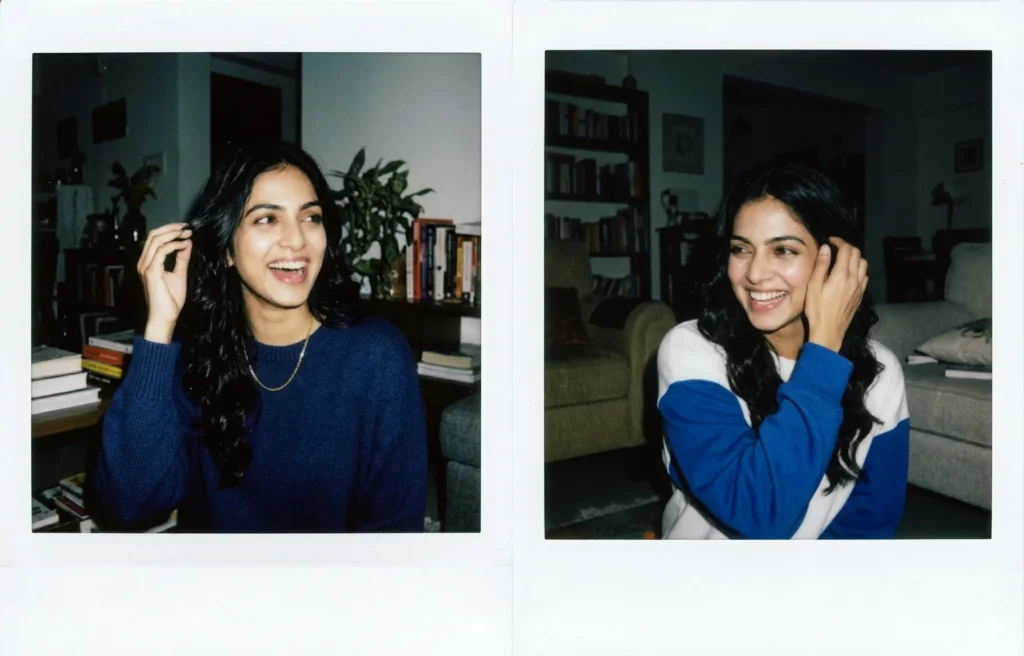
Create a Polaroid-style instant film photograph. Subject: A young woman. Pose: Mid-laugh, looking off-camera as if caught by surprise, one hand casually brushing hair out of her face. Clothing: Everyday casual wear, relaxed fit. Environment: An undefined, slightly cluttered casual living room, feeling lived-in and natural. Lighting: Direct on-camera flash exposure in a dim room, creating a bright subject and dark background. Style: Spontaneous and unposed, ISO 800 film grain, authentic Polaroid aesthetic with subtle color banding near edges, classic white Polaroid border with 3mm sides and a thicker 8mm bottom margin. Camera: 35mm lens equivalent, slightly off-center framing, candid perspective.
2. The Bedroom / Indoor Moment
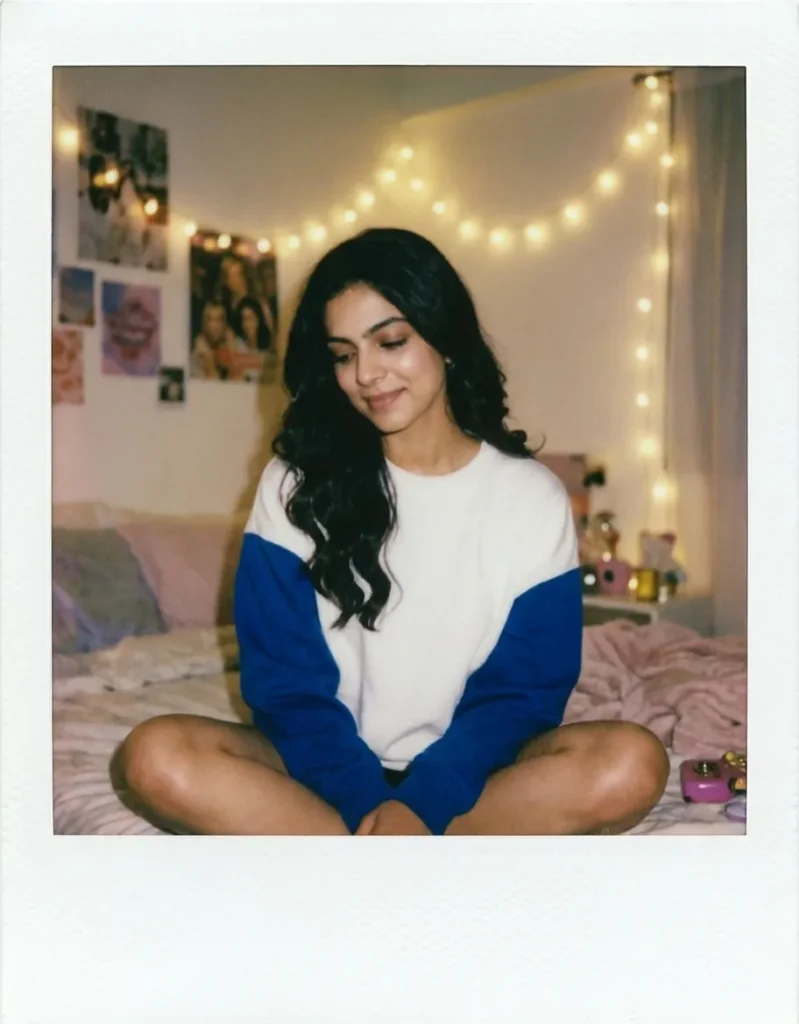
Create a Polaroid-style instant film photograph. Subject: A young person. Pose: Sitting cross-legged on a bed, looking down slightly with a soft, relaxed smile. Clothing: Cozy oversized sweater. Environment: A vintage Y2K aesthetic bedroom, posters on the wall blurred in the background, soft textures. Lighting: Soft indoor string-light (fairy light) glow mixed with a gentle camera flash fill, warm highlights and gentle shadows. Style: Nostalgic and intimate, visible film grain but softer than a harsh flash, slightly faded retro colors, classic white Polaroid border with 3mm sides and a thicker 8mm bottom margin. Camera: 50mm lens equivalent, eye-level angle, shallow depth of field.
3. The Golden Hour Outdoor Shot
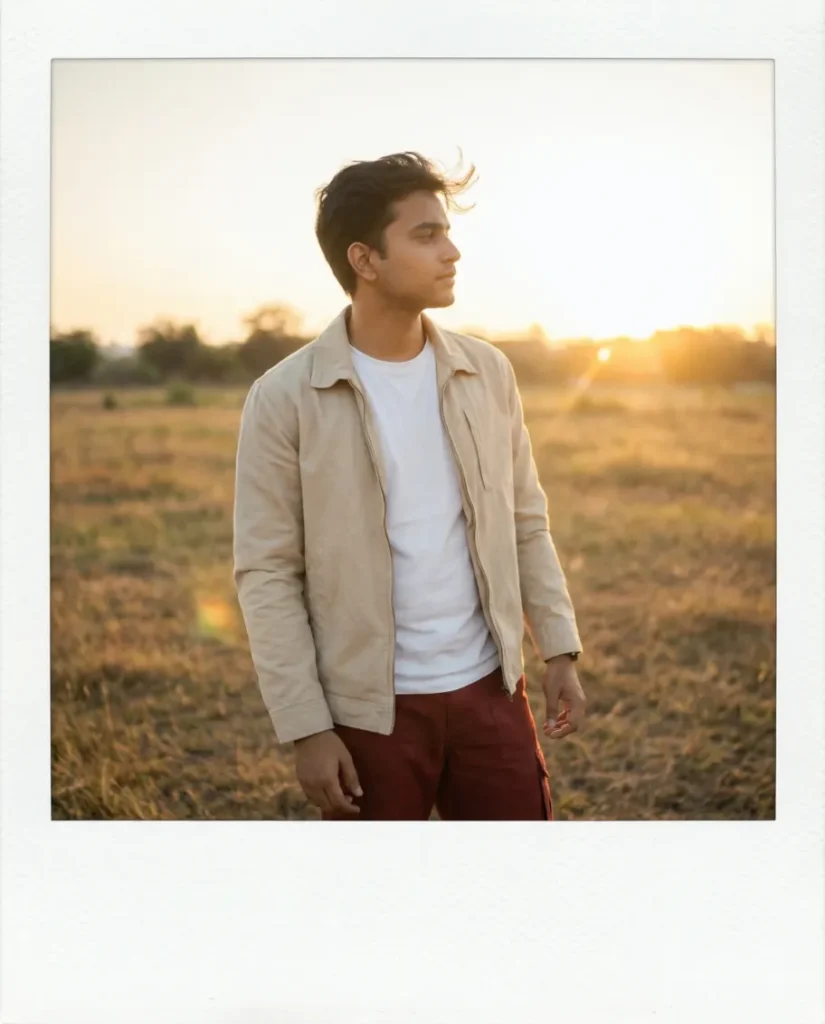
Create a Polaroid-style instant film photograph. Subject: A young man. Pose: Standing casually outdoors, looking toward the horizon, wind gently blowing his hair. Clothing: Light summer jacket and t-shirt. Environment: An open field or quiet outdoor street, blurred natural background. Lighting: Golden hour sunlight hitting from the side, soft lens flare, slight warm overexposure on highlights, glowing skin tones. Style: Nostalgic and quiet, gentle ISO 400 film grain, warm chemical color bias (yellow/orange shift), classic white Polaroid border with 3mm sides and a thicker 8mm bottom margin. Camera: 50mm lens equivalent, natural perspective, dreamy atmosphere.
4. The Dark Room Flash (Most Realistic)
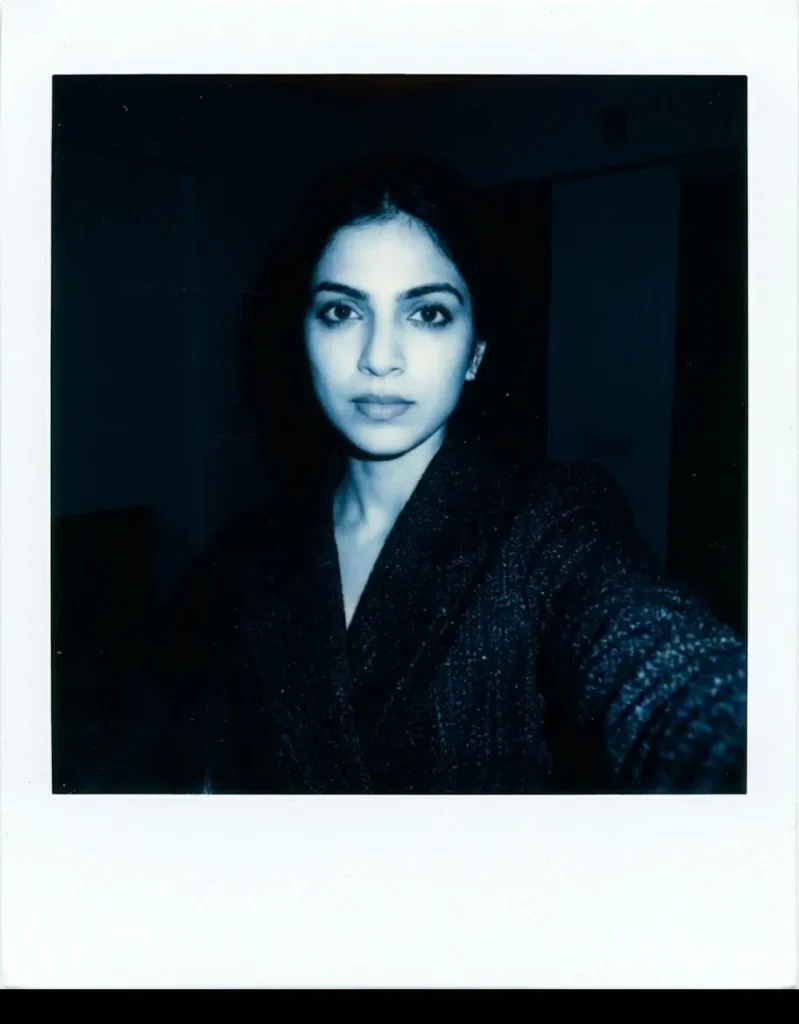
Create a Polaroid-style instant film photograph. Subject: A young woman. Pose: Standing close to the camera, looking directly at the lens with a striking, neutral expression. Clothing: Dark, textured jacket. Environment: A completely dark, undefined room. Lighting: Harsh, direct camera flash, creating strong highlights with a slightly cool (blueish) tint, deep black shadows falling immediately behind the subject. Style: Gritty realism, pronounced ISO 800 film grain, high contrast, authentic analog imperfections and flash glare, classic white Polaroid border with 3mm sides and a thicker 8mm bottom margin. Camera: 35mm lens equivalent, close-up portrait framing.
5. The Stacked Polaroid (Instagram Stories Format)
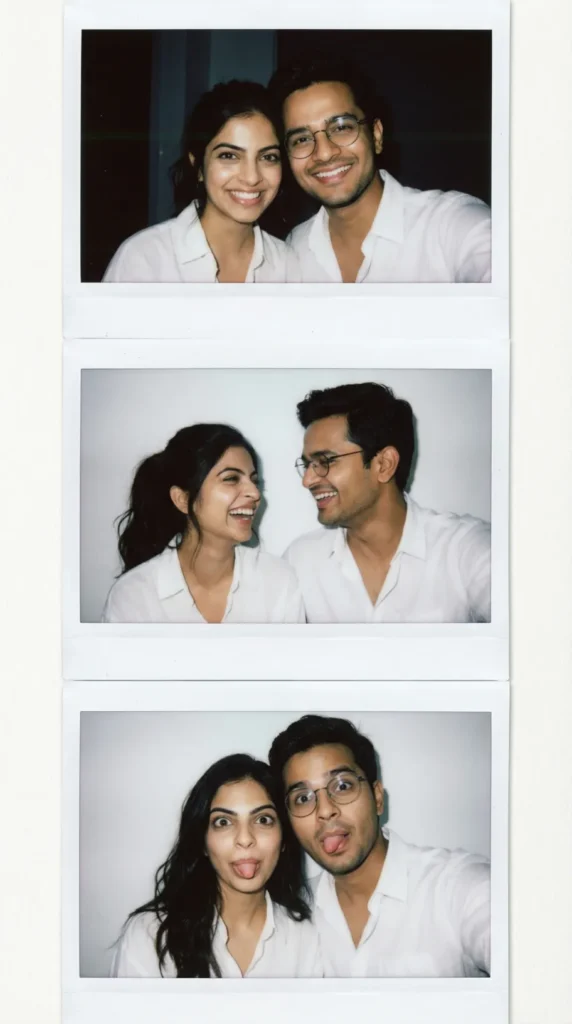
Create a vertical 9:16 graphic featuring three stacked Polaroid-style instant film photographs. Subject: The same young couple in all three photos. Poses: Top photo: smiling warmly at the camera. Middle photo: candidly laughing and looking at each other. Bottom photo: making silly faces or playfully posing. Environment: A simple white wall or plain curtain background across all frames. Lighting: Consistent direct flash exposure in a low-light interior. Style: Photorealistic collage layout arranged vertically, each photo features visible ISO 800 film grain, slight color banding, and its own classic white Polaroid border with a thicker 8mm bottom margin. Camera: Natural candid framing for each individual shot.
How to Use These Prompts in Gemini
Using a polaroid prompt in Gemini is straightforward, but a couple of details will make a real difference in your results.
Step 1: Open Gemini on web or mobile and sign in with your Google account.
Step 2: Select the Create Image tool (the 🖼️ icon – yes, the banana) from the tool options.
Step 3: Upload your photo first, then paste your prompt in the same message. Don’t send them separately, Gemini processes them together.
Step 4: If the first result doesn’t quite nail the border or grain, reply with a follow-up: “Make the grain more visible and add a thicker bottom border.” Gemini handles conversational refinement well. You can iterate.
Step 5: Download the result.
Gemini images include Google’s invisible SynthID watermark, whether you create them in the app or via the API, so they can be identified as AI‑generated. Some app interfaces may also add a small visible badge in a corner; if you need a cleaner presentation for print, using the Gemini API or a developer toolchain can give you the image without that extra on‑screen badge, but the invisible SynthID watermark itself cannot be removed.
Common Mistakes and How to Fix Them
The border looks symmetric.
- Add “thicker bottom margin” to your prompt, Gemini defaults to equal borders without that instruction.
Faces look different from the upload.
- You need to say “do not change the faces” explicitly, every time. It’s not automatically preserved unless specified.
The image looks too clean / digital.
- Add “pronounced film grain” and “analog imperfections” to your prompt. Lean into the imperfection, that’s what makes polaroids feel real.
Text on the bottom margin is garbled.
- Gemini still struggles with accurate text rendering in images. If you want a date or caption on the border, keep it to 3–4 words maximum and specify “clear legible handwritten script.” For longer text, generate the polaroid without text and add it afterward in Canva.
The result looks too posed.
- Use language like “candid,” “spontaneous,” “caught by chance,” “no obvious staging.” This shifts the model toward a more natural composition.
Taking It Further: Nano Banana Pro for Advanced Results
If you’re using Gemini through AI Studio and have access to the Nano Banana Pro model (Gemini 3 Pro Image), you can push polaroid prompts significantly further. The Pro model responds better to technical specifications, things like specifying a 35mm lens look, exact lighting angles, or ISO-equivalent film sensitivity.
A Pro-tier polaroid prompt might look like this:
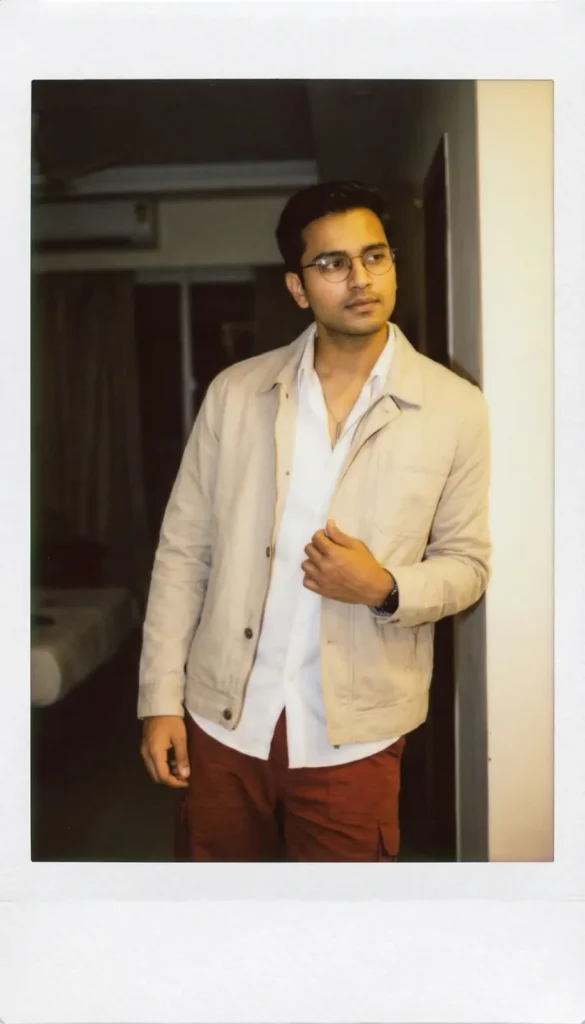
Create a Polaroid-style instant film photograph. Subject: A young man. Pose: Standing casually with a slight lean, one hand adjusting his jacket, the other relaxed by his side, head slightly tilted, eyes looking off-camera with a calm, introspective expression. Clothing: Simple casual outfit with a light jacket, neutral tones, slightly textured fabric. Environment: A dimly lit indoor setting, minimal background detail, soft shadows and subtle depth. Lighting: Direct flash exposure in a low-light interior, slight overexposure on highlights, warm color bias with a gentle yellow shift on skin tones. Style: ISO 800 film grain, visible but not overwhelming, authentic Polaroid aesthetic with subtle color banding near edges, slight motion blur on background elements, classic white Polaroid border with 3mm sides and a thicker 8mm bottom margin. Camera: 35mm lens equivalent, centered framing, natural perspective.
That level of specificity gets you much closer to a studio-quality vintage result.
Why This Trend Isn’t Going Away
The Gemini Nano Banana polaroid trend exploded because it hit something real: people want photos that feel like memories, not marketing materials. The slight imperfection of instant film, the grain, the slightly uneven color, the asymmetric border, reads as authentic in a way that perfectly sharp, perfectly color-corrected digital photos often don’t.
That emotional quality is hard to replicate through regular filters. But with the right polaroid prompt for Gemini, you’re not applying a filter. You’re instructing an AI that understands photographic techniques to simulate the actual conditions under which a real polaroid would have been taken.
That’s a fundamentally different thing. And it shows in the results.
Wrapping Up
The formula isn’t complicated, but the details matter. White border with a thicker bottom margin. Flash lighting scattered from a dark room. Film grain that’s present but not overwhelming. Faces preserved explicitly. And specificity, always specificity, over vague vintage aesthetics.
Start with the Foundation Prompt above, pick the scenario prompt that matches your shot, and iterate from there. Gemini’s conversational interface makes refinement easy. Most good results come from the second or third generation, not the first.